CUDA에서 host에서 device로 memory를 복사하는 방법은 cudaMemcpy API 를 활용하는 방법이 있다. 기본적으로 별다른 작업 없이 선언된 host의 데이터는 pageable data로 동작한다. pageable data로부터 데이터를 device에 복사하기 위해서는 host 내부에서 pageable -> pinned memory로 한 번 옮겨가야 하기 때문에 속도가 느려지게 된다. cudaMallocHost 로 직접 memory pinning, non-pageable memory를 선언하게 되면, 해당 과정이 생략되기 때문에 복사가 더욱 빠르게 이루어진다.
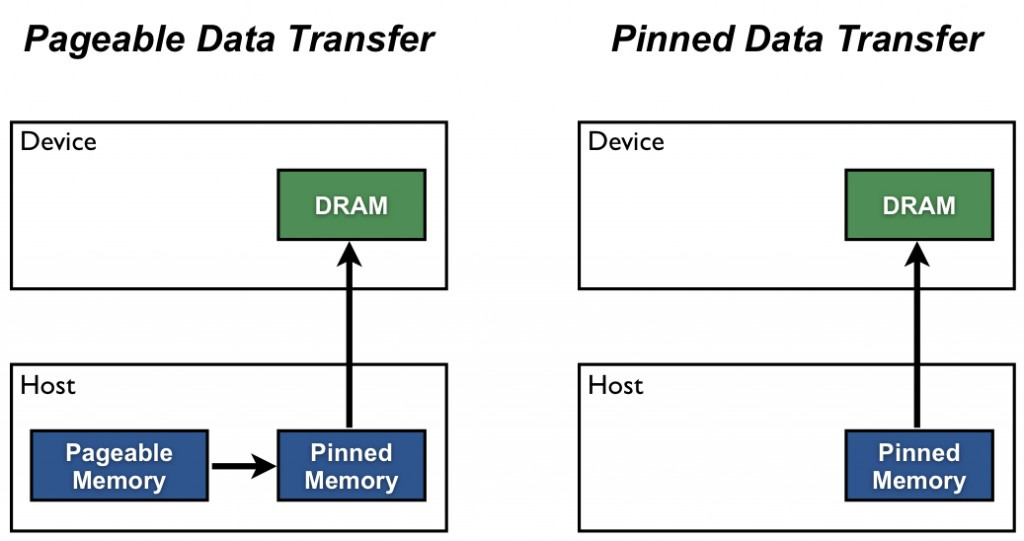
1GB의 메모리를 device로 복사하는 경우의 두 방법의 속도 차이는 다음과 같다.
$ ./pinned_memory
Pinned memory
Total time: 185.875 ms
Average time per copy: 18.5875 ms
Data size: 1 GB
Bandwidth: 53.7997 GB/s

Pageable memory
Total time: 367.491 ms
Average time per copy: 36.7491 ms
Data size: 1 GB
Bandwidth: 27.2116 GB/s
Pinned memory를 사용하면 속도가 빨라짐을 알 수 있다. 하지만 시스템 메모리를 사용하는 만큼 상황에 맞게 사용해야함을 주의하자.
References
'development' 카테고리의 다른 글
| Online normalizer calculation for softmax (1) | 2025.07.12 |
|---|---|
| [CUDA] Triton kernel linking, with CUDA C++ (0) | 2025.07.05 |
| [CUDA] Shared memory: Bank Conflicts (0) | 2024.12.02 |
| [CUDA] GPU는 어떻게 빠른 연산이 가능할까? (0) | 2024.09.10 |
| [ML] Resnet paper study (0) | 2024.08.20 |