Until now
기존의 CUDA 프로그래밍은 CUDA C++을 바탕으로 하고 있었다. SIMT 기반으로 데이터를 블록과 스레드에 맵핑해줄 필요가 있다. 세밀한 설계를 통해 최선의 성능을 이끌어 낼 수 있으나, 모두가 손쉽게 할 수 있지는 않은 일이다. 또한 GPU 아키텍쳐가 발전함에 따라서 하드웨어 스펙도 달라지니 커널 개발자는 각 GPU에 맞는 최선의 커널을 다르게 개발해야했다.
이런 어려움에 대해 떠오른 것이 triton-language다(NVIDIA Triton Inference Server와는 관계가 없다). Triton은 메모리관리, 동기화, 텐서코어 스케쥴링 등 블록 레벨의 추상화를 통해 접근성을 높였다. 이에 더해 MLIR을 통해 NVIDIA GPU뿐 아니라 AMD, NPU 등 다양한 하드웨어 백엔드로 이어질 수 있는 수단으로 확장된 추세이다.
물론 NVIDIA에서도 이런 어려움을 극복하기 위한 CUTLASS와 같은 라이브러리를 제공한다. 작은 타일 레벨의 operation들을 템플릿화해서 최적의 커널을 비교적 손쉽게 개발할 수 있다. FlashAttention-3도 CUTLASS 기반으로 작성되었다. 하지만 비교적 쉬운게, 진짜 쉬운건 아니다. 수많은 템플릿과 로직을 알고 있어야했다. 이 또한 결국 CUDA C++을 알아야한다.
CUDA Tile IR
그러던 와중 2025년 봄에 발표된 내용. NVIDIA에서 타일 기반의 프로그래밍 모델을 개발한다는 소식이다. 언제 공개되나 기다렸는데 25년이 다 가기전에 공개했다.
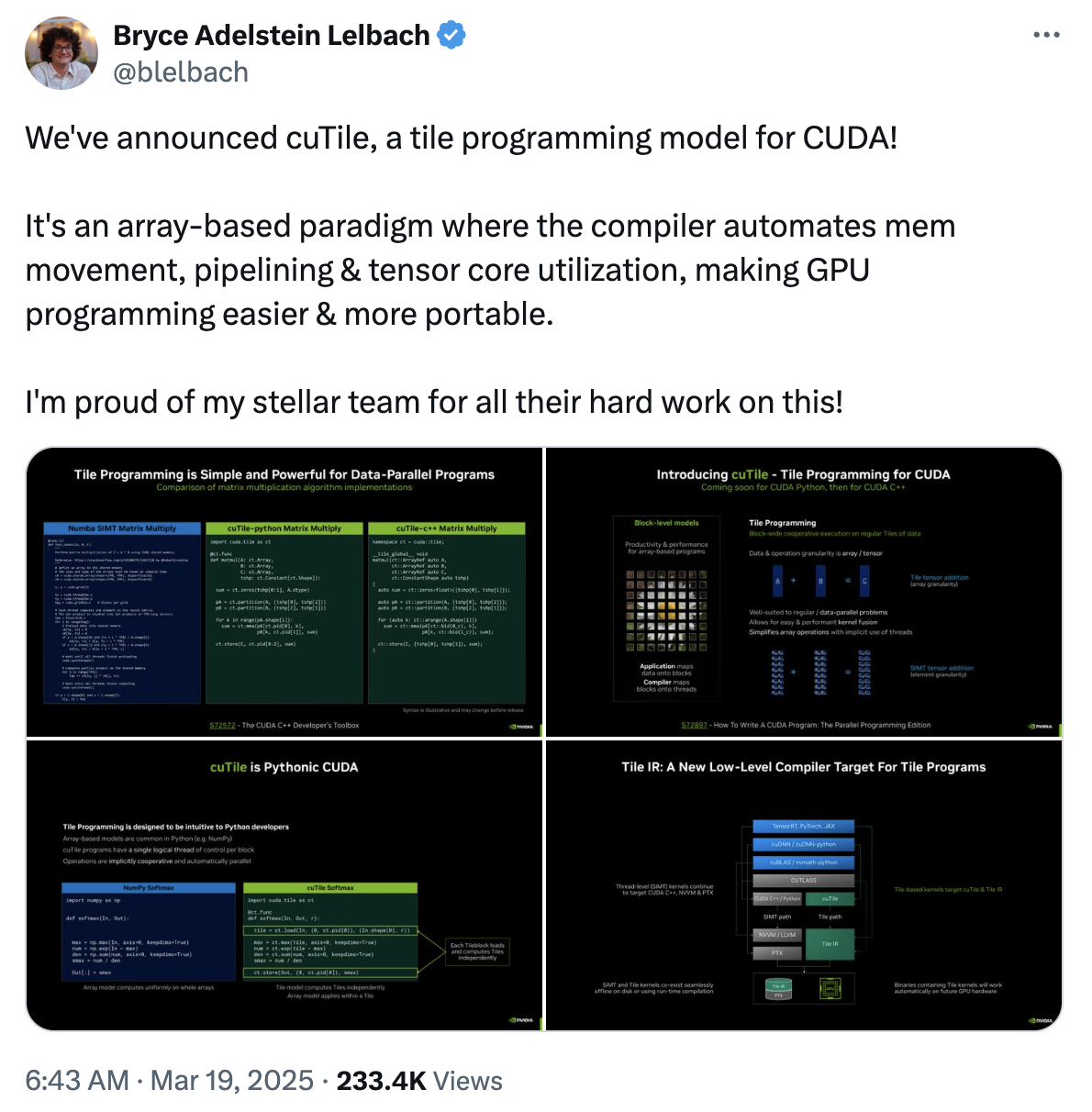
cuTile은 기존 SIMT 기반 프로그래밍 모델과 같은 레벨에 머무른다. 이야기는 즉슨 CUDA C++ 코드 개발 -> PTX -> CUBIN 으로 이어지던 패스에 더해서 Tile IR -> CUBIN 으로 이어지는 패스가 추가된 것이다.
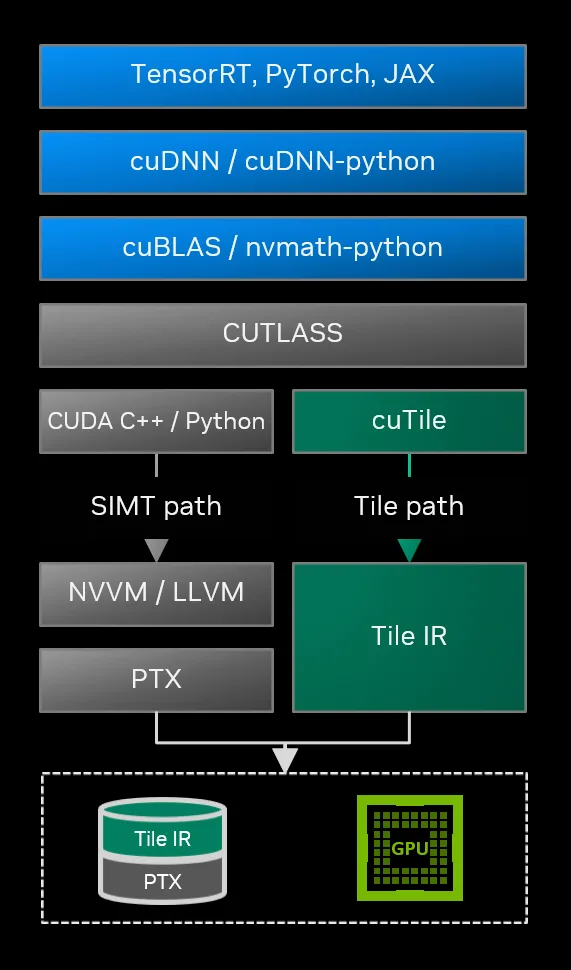
Tile IR은 MLIR Dialect 기반으로 구성될 예정이고, bytecode로 저장된다고 한다. 직접 Tile IR를 건드리는 부분을 개발할 것이 아니라면 cuTile Python을 사용하면 된다.
- NVIDIA cuTile Python: 대부분의 개발자는 여기에 해당된다. CUDA Tile IR을 백엔드로 사용하는 Python 구현체이다.
- CUDA Tile IR: 자체 DSL 컴파일러 또는 라이브러리를 개발하려는 개발자는 CUDA Tile IR을 사용한다.
cuTile Python: how-to install
개발 환경은 공식문서에서 가지고 왔다.
- Linux x86_64, Linux aarch64 or Windows x86_64
- A GPU with compute capability 10.x or 12.x
- NVIDIA Driver r580 or later
- CUDA Toolkit 13.1 or later
- Python version 3.10, 3.11, 3.12 or 3.13
환경이 구성되었다면, pip으로 설치하자. torch 또한 환경에 맞춰서 설치하면 된다.
pip install cuda-tile
pip install cupy-cuda13x  # For sample
pip install pytest numpy  # For test
Key concepts: Tile vs. SIMT
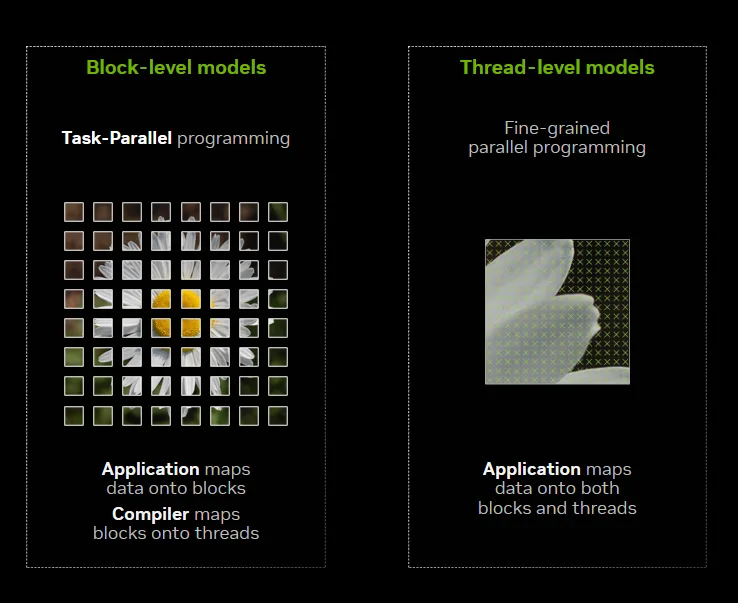
타일 모델(왼쪽)은 데이터를 블록으로 분할하고 컴파일러는 이를 스레드에 매핑한다. SIMT 모델(오른쪽)은 데이터를 블록과 스레드 모두에 매핑한다. SIMT는 각 스레드를 모두 컨트롤할 수 있지만, 그만큼 최상의 성능을 위해서는 하드웨어의 복잡성을 고려한 수동 튜닝이 필요하다. 타일모델은 하드웨어의 복잡성을 일부 추상화함으로써 CUDA 컴파일러/런타임이 타일 알고리즘을 내부적으로 처리하게 하고, 유저는 알고리즘 개발에 집중할 수 있게 한다.
Kernel Definition
@ct.kernel 데코레이터는 Python 함수를 GPU 커널로 컴파일한다. 위에서 알아본것처럼, 이 커널의 내용은 CUDA C++ 을 거쳐서 ptx가 만들어지는 것이 아니라 Tile IR로 내려오고 MLIR을 통해서 CUDA TILE IR을 사용하여 cubin을 생성한다.
import cuda.tile as ct

@ct.kernel
def vector_add(a, b, c, tile_size: ct.Constant[int]):
    ...

class kernel(TileDispatcher):
    constant_flags = get_constant_arg_flags(function)
    compiler_options = CompilerOptions(
        num_ctas=num_ctas,
        occupancy=occupancy,
        opt_level=opt_level
    )
    compile = _compile.CompileCallback(function, compiler_options)
    super().__init__(constant_flags, compile)
    self._pyfunc = function
Tutorial w/ vector addition
CUDA 프로그래밍의 가장 기초인 vector addition kernel을 통해 어떻게 사용하는지 알아보자.
__global__ void vecAdd(float* A, float* B, float* C, int vectorLength)
{
 /* calculate my thread index */
 int workIndex = threadIdx.x + blockIdx.x*blockDim.x;

 if(workIndex < vectorLength)
 {
  /* perform the vector addition */
  C[workIndex] = A[workIndex] + B[workIndex];
 }
}
1D Tile
가장 단순한 형태의 cuTile 커널이다.
- GPU 메모리에서 하나 이상의 타일 로드
- 타일에 대한 계산을 수행하여 새로운 타일을 생성
- 결과 타일을 GPU 메모리에 저장
import cuda.tile as ct

@ct.kernel
def vector_add(a, b, c, tile_size: ct.Constant[int]):
  # Get the 1D pid, blockIdx.x in cuda c++
  pid = ct.bid(0)

  # Load input tiles
  a_tile = ct.load(a, index=(pid,) , shape=(tile_size, ) )
  b_tile = ct.load(b, index=(pid,) , shape=(tile_size, ) )

  # Perform elementwise addition
  result = a_tile + b_tile

  # Store result
  ct.store(c, index=(pid, ), tile=result)
ct.bid(0)는 axis-0을 따라 블록ID를 가져온다. CUDA C++에서 blockIdx 를 가져오는 것과 동일하다. ct.load()는 필요한 인덱스, 타일모양만큼 메모리에서 데이터를 로드한다. 불러온 a_tile, b_tile을 더하는 것은 + 연산자로 충분하며, 그 결과는 result 타일에 가지고 있고, 이 타일은 아직 DRAM에는 저장되지 않았으니, ct.store()를 통해 저장한다.
2D Tile
1D 타일을 2D로 reshape하면 행렬 연산에 적합한 형태가 된다. 인덱싱은 다음과 같이 정말 직관적이다.
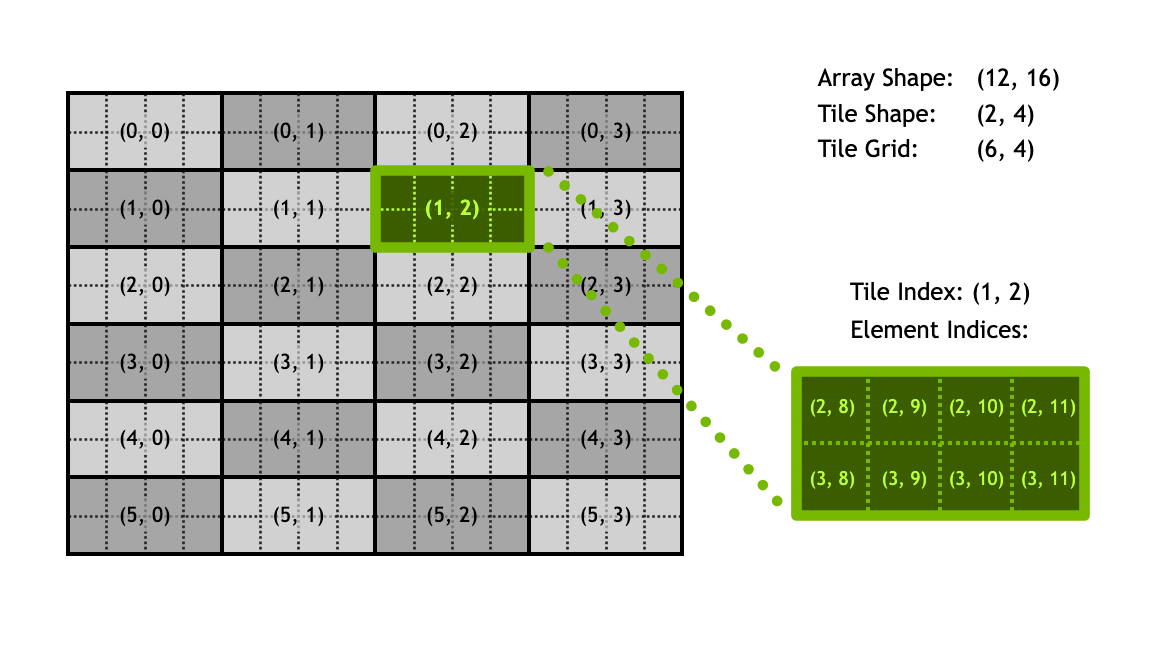
@ct.kernel
def vec_add_kernel_2d(a, b, c, TILE_X: ct.Constant[int], TILE_Y: ct.Constant[int]):
    # Get the global IDs of the current block along the X and Y axes.
    # `ct.bid(0)` for the first grid dimension (typically rows),
    # `ct.bid(1)` for the second grid dimension (typically columns).
    bid_x = ct.bid(0)
    bid_y = ct.bid(1)

    # Load `TILE_X` x `TILE_Y` chunks from input matrices 'a' and 'b'.
    # The `index=(bid_x, bid_y)` specifies the 2D tile to load.
    a_tile = ct.load(a, index=(bid_x, bid_y), shape=(TILE_X, TILE_Y))
    b_tile = ct.load(b, index=(bid_x, bid_y), shape=(TILE_X, TILE_Y))

    # Perform the element-wise addition on the loaded tiles.
    sum_tile = a_tile + b_tile

    # Store the resulting `TILE_X` x `TILE_Y` chunk back to the output matrix 'c'.
    ct.store(c, index=(bid_x, bid_y), tile=sum_tile)
When tiles don’t fit
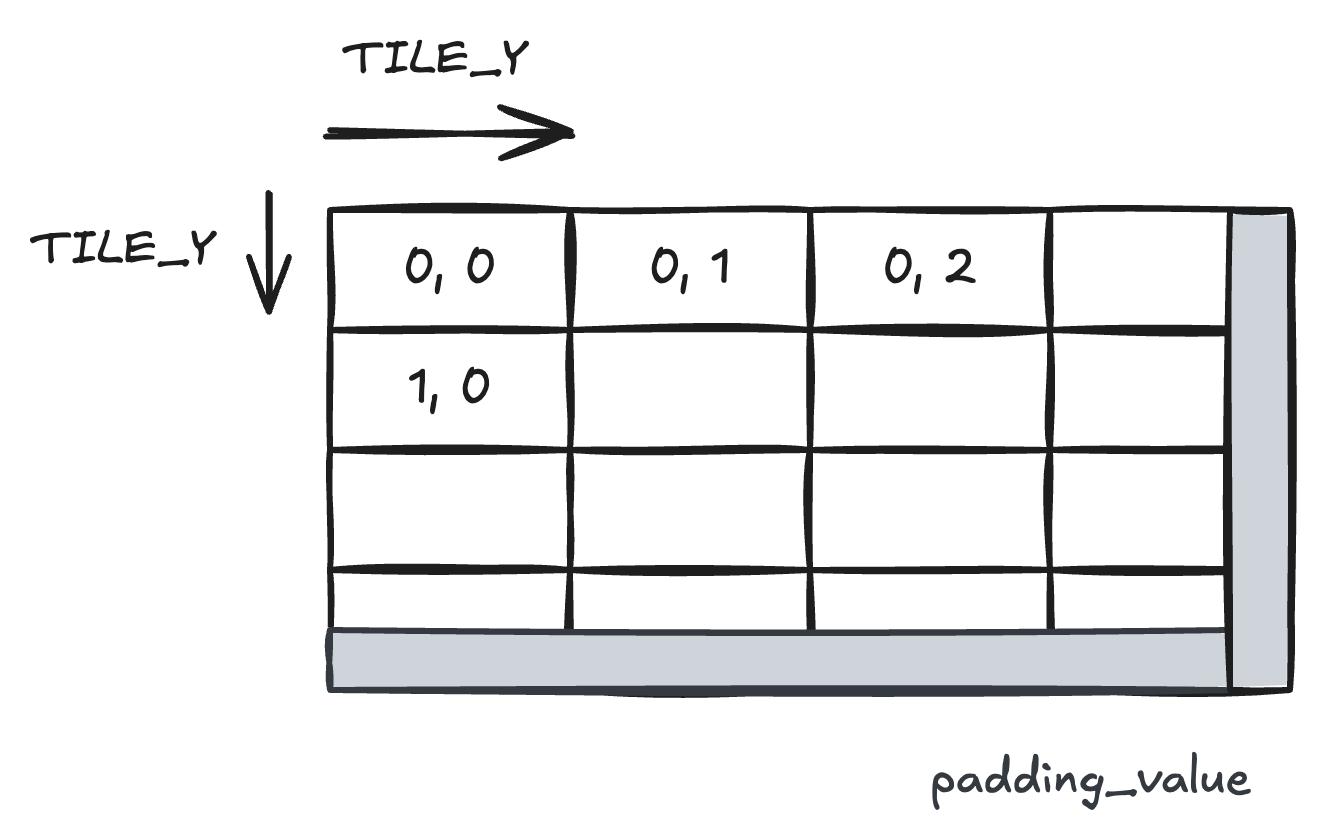
위의 두 예시는 전체 데이터 사이즈가 타일사이즈에 딱 나누어 떨어지는 경우다. 타일에 align되지 않는 경우에는 ct.gather(), ct.scatter() 를 사용한다. 2의 제곱이 아닌 경우에도 추천된다. 범위를 벗어나는 경우, padding_value (default:0) 가 반환된다.
@ct.kernel
def vec_add_kernel_2d_gather(
    a, b, c,
    TILE_X: ConstInt, TILE_Y: ConstInt  # Tile dimensions for this block
):
    # Get the global IDs of the current block along the X and Y axes.
    bid_x = ct.bid(0)
    bid_y = ct.bid(1)

    # Calculate X and Y indices within the current block's tile.
    x = bid_x * TILE_X + ct.arange(TILE_X, dtype=torch.int32)
    y = bid_y * TILE_Y + ct.arange(TILE_Y, dtype=torch.int32)

    # Reshape the X and Y indices to (TILE_X, 1) and (1, TILE_Y), respectively.
    # This way, they can be broadcasted together to a common shape (TILE_X, TILE_Y).
    x = x[:, None]
    y = y[None, :]

    # Load elements using the calculated X and Y indices.
    # Both `a_tile` and `b_tile` have shape (TILE_X, TILE_Y).
    a_tile = ct.gather(a, (x, y))
    b_tile = ct.gather(b, (x, y))

    # Perform the element-wise addition.
    sum_tile = a_tile + b_tile

    # Store the result back to `c` using the same index tiles.
    # `ct.scatter()` only writes data to positions within the array bounds.
    ct.scatter(c, (x, y), sum_tile)
Performance
cutile-python/test/bench_matmul.py 을 돌려보면 결과는 다음과 같다. Torch kernel은 내부적으로 cutlass 커널을 호출한다. 아직 torch에 비해서 성능이 느리지만, tile-based programming이 가능해짐으로써 커널 구현 난이도가 크게 감소한 것은 희망차다. IR 또한 오픈소스로 공개되었으니 성능적인 면에서는 앞으로 점차 개선될 것이다.
--------------------------------------------------------------------------------------------------- benchmark 'matmul': 12 tests ---------------------------------------------------------------------------------------------------
Name (time in us)                                 Min                     Max                    Mean              StdDev                  Median                 IQR            Outliers          OPS            Rounds  Iterations
------------------------------------------------------------------------------------------------------------------------------------------------------------------------------------------------------------------------------------
bench_matmul[1K-1K-1K-f16-torch]              14.3439 (1.0)           14.3451 (1.0)           14.3443 (1.0)        0.0005 (1.0)           14.3441 (1.0)        0.0005 (1.0)           1;0  69,714.0067 (1.0)           5        5244
bench_matmul[1K-1K-1K-f32-torch]              26.6370 (1.86)          26.6386 (1.86)          26.6374 (1.86)       0.0006 (1.37)          26.6372 (1.86)       0.0005 (1.02)          1;1  37,541.1889 (0.54)          5        3218
bench_matmul[1K-1K-1K-f16-cutile]            154.3699 (10.76)        154.4450 (10.77)        154.4040 (10.76)      0.0277 (58.67)        154.4062 (10.76)      0.0332 (73.27)         2;0   6,476.5145 (0.09)          5         613
bench_matmul[1K-1K-1K-f32-cutile]            892.8400 (62.25)        893.2511 (62.27)        893.0082 (62.26)      0.1616 (342.04)       893.0112 (62.26)      0.2286 (505.17)        2;0   1,119.8106 (0.02)          5         112
References
'development' 카테고리의 다른 글
| [CUDA] GPU Architectures w/ LLM (2) | 2025.11.24 |
|---|---|
| [CUDA] fp32 GEMM 최적화 (0) | 2025.10.26 |
| [CUDA] Proper thread indexing and memory coalescing (6) | 2025.07.25 |
| Online normalizer calculation for softmax (1) | 2025.07.12 |
| [CUDA] Triton kernel linking, with CUDA C++ (0) | 2025.07.05 |